Social game-day graphics, automated
examples/automation/sdvplot_social.py is a complete, scheduled social-media workflow built on sdvplot. One script
makes season leaderboards and game-day graphics from live data, writes alt text and captions for them, and posts them
to Bluesky. A GitHub Actions template runs it every week. The data comes from ESPN's public APIs through
sportsdataverse-py, so nothing needs an API key.
It covers the NFL, college football, the NBA, the WNBA, MLB and the NHL.
What it makes
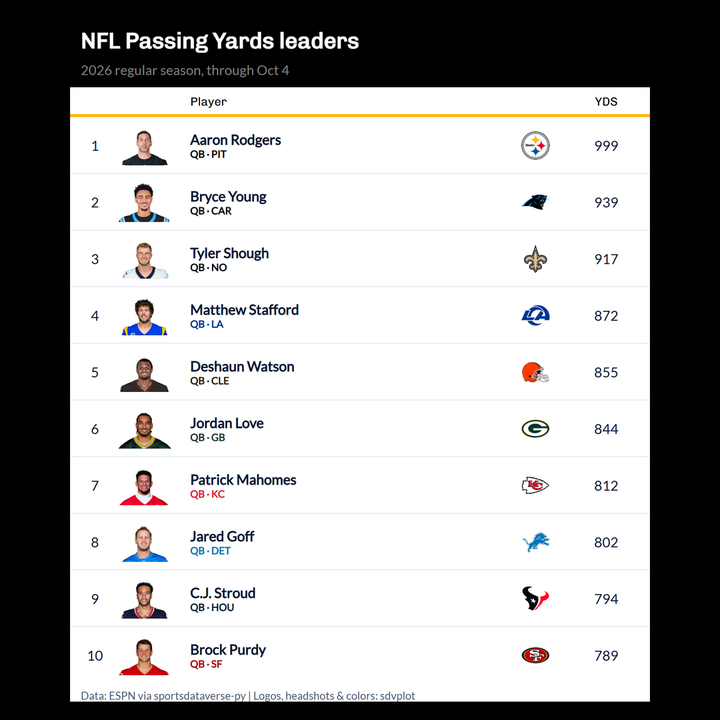
A leaderboard (leaderboard) is a great_tables table of a season's
leaders in any ESPN leaders category. Each row has the player's headshot, team logo and a team-colored subtitle. The
table is themed in the leading player's team colors (gt_theme_sdv_team) and saved at a social size
(gt_social_crop): 1080 x 1080, or 1200 x 675 with --size landscape.
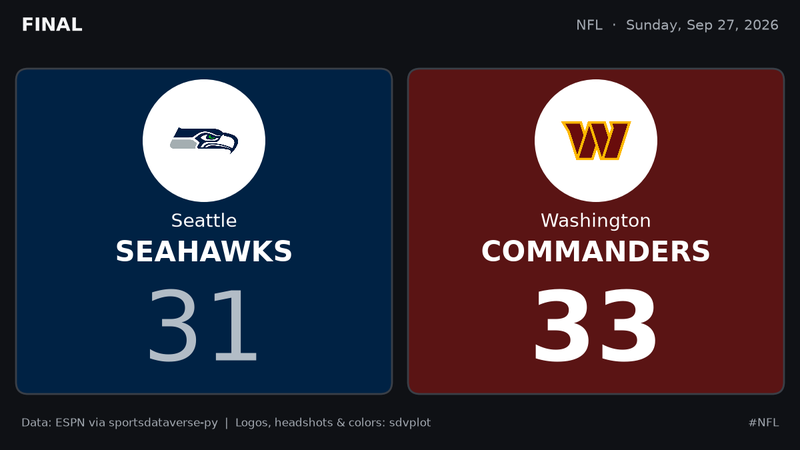
Final-score cards (gameday) are matplotlib images, 1200 x 675, one per game. Each team sits on its own color
(team_colors), with its logo on a white disc so a logo drawn in the team's own color still shows. The score is
printed in black or white, whichever reads better on that color. The winner's score is bold (after a tie, neither
is).
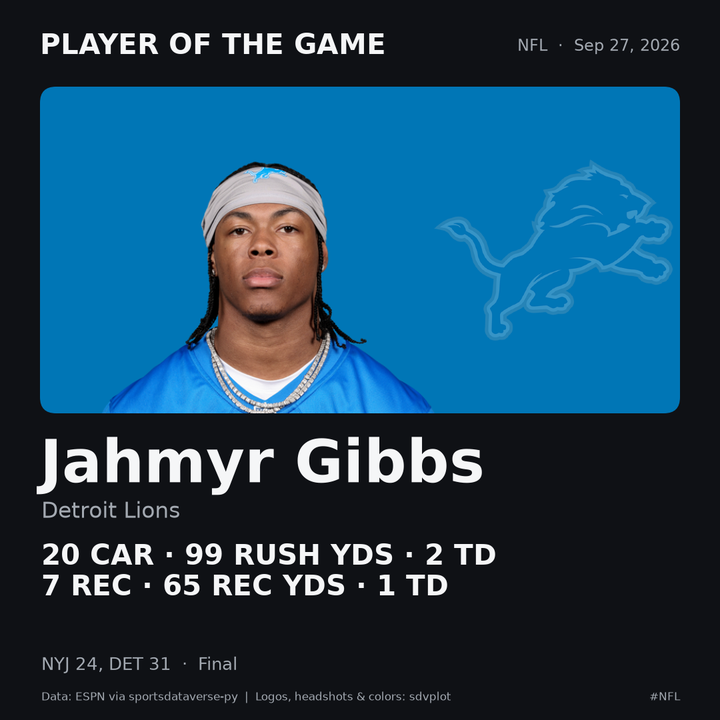
A player-of-the-game card (also gameday), 1080 x 1080, shows the day's best performance by a player on a
team that did not lose, across all of the day's finals (not only the games that get a card). It has the headshot
(add_headshots) on the team's color, the stat line and the result.
The images above are real output for September 27, 2026, scaled down for this page. Every image carries a source credit.
"Best performance" is a simple rule per sport, and you can change it:
| Sport | Rule |
|---|---|
| Basketball | John Hollinger's game score |
| Football | Standard fantasy points (passing yards 0.04, rushing and receiving yards 0.1, touchdowns 4 or 6, interceptions -2) |
| Hockey | A simplified Dom Luszczyszyn game score; goalies by saves and goals against |
| Baseball | Batters by hits, home runs, RBIs, runs and walks; pitchers by outs and strikeouts, less runs, hits and walks |
Offseason-safe
Neither command fails because a league is between seasons:
gamedayuses the most recent date with finished games when the requested date has none. It walks back through ESPN's season calendar, and moves to the season before when the new one hasn't started.leaderboarduses the latest season that has regular-season leaders.
Both say what they substituted in the caption, for example "No 2026-27 regular-season leaders yet, so these are 2025-26."
Run it locally
From a clone of sdvplot:
uv sync --all-extras --all-groups
uv run python examples/automation/sdvplot_social.py leaderboard --league nfl
uv run python examples/automation/sdvplot_social.py leaderboard --league nba --stat assistsPerGame --size landscape
uv run python examples/automation/sdvplot_social.py gameday --league nfl --date 2026-09-27
uv run python examples/automation/sdvplot_social.py post
The leaderboard renders in headless Chrome (great_tables' gtsave), so Chrome or Chromium must be installed. Set
CHROME_PATH for a non-standard install. The game-day cards need only matplotlib.
Each command writes its PNGs to out/<today>/ and adds its posts to out/<today>/manifest.json. A re-run replaces
its own posts and keeps the others. post reads the newest out/<date>/manifest.json unless you pass
--manifest:
{
  "version": 1,
  "date": "2026-10-04",
  "posts": [
    {
      "key": "nfl-gameday-2026-09-27-1",
      "fresh": true,
      "thread": "nfl-20260927",
      "league": "nfl",
      "kind": "gameday",
      "caption": "NFL final scores, Sunday, Sep 27, 2026. Player of the game: Jahmyr Gibbs, ...",
      "hashtags": ["NFL", "sdvplot"],
      "images": [
        {"path": "nfl-20260927-player-of-the-game.png", "alt": "Player of the game card with a headshot: ...",
         "width": 1080, "height": 1080}
      ]
    }
  ]
}
A Bluesky post holds at most four images. A slate with more games becomes a thread: the first post carries the player card and three score cards, and each later post carries four more cards and replies to the first.
Each post has a key (league, kind, and the game date or the season) and a fresh flag. A game-day post is
fresh when its games are from the requested date, not an offseason stand-in. A leaderboard is fresh while its
season is under way, so its data runs through today; a finished season's table is stale.
| Option | Command | Meaning |
|---|---|---|
--league | leaderboard, gameday | nfl, cfb, nba, wnba, mlb or nhl |
--season | leaderboard | the season (the year it ends, for the NBA and NHL); default: the current one |
--stat | leaderboard | an ESPN leaders category, such as rushingYards, assistsPerGame, ERA or goals. An unknown one lists the league's categories |
--top | leaderboard | rows: default 10 square, 5 landscape |
--size | leaderboard | square (1080 x 1080) or landscape (1200 x 675) |
--date | gameday | YYYY-MM-DD; default yesterday |
--max-games | gameday | cards to draw, ranked teams first; default 8 |
--out | all | the output root; default out |
--manifest | post | the manifest to post; default the newest under --out |
--post | post | really post (otherwise a dry-run) |
--include-stale | post | post stale posts too |
--ledger | post | the posted-ledger; default <out>/posted.json |
Post to Bluesky
post is a dry-run unless you pass --post. It checks every post the way Bluesky would: one to four images, alt
text on each, and text of at most 300 graphemes. A long caption is shortened and keeps its hashtags. Then it prints
each post's text, images and alt text, and whether it would be posted or skipped.
Two rules keep a schedule from repeating itself:
- Only fresh posts go out. Stale ones (an offseason stand-in date, a finished season's leaders) are skipped
unless you pass
--include-stale. From February to August, a weekly NFL run makes the Super Bowl card but does not post it again each week. - Nothing is posted twice.
postkeeps a ledger,out/posted.json, beside the dated folders. Each post's key is recorded as soon as the post is made, so a re-run skips it. A thread that failed partway resumes where it stopped, replying to the posts already made.
To post for real:
-
In Bluesky, open Settings > Privacy and security > App passwords and create an app password. Never use your account password.
-
Export the handle and app password, then post:
export BSKY_HANDLE=yourname.bsky.socialexport BSKY_APP_PASSWORD=xxxx-xxxx-xxxx-xxxxuv run python examples/automation/sdvplot_social.py post --post
The script uses three AT Protocol calls over plain requests:
com.atproto.server.createSessionlogs in.com.atproto.repo.uploadBlobuploads each image. A PNG over Bluesky's 1 MB limit is sent as a JPEG.com.atproto.repo.createRecordcreates the post, with each image's alt text and aspect ratio and with the hashtags as tag facets.
If Bluesky answers 429 (rate limited), the script waits until the reset time it gives, at most a minute, and tries
again, up to four attempts in all. Logging in and uploading also retry a 5xx answer or a dropped or timed-out
connection, after 1, 2 and 4 seconds. Creating the post is never retried after such a failure, because the post
may exist. Its ledger entry stays pending, and later runs skip it until you check the account and delete the
entry. Errors name the call and Bluesky's error, never the credentials. Set BSKY_SERVICE to post through
another PDS; unset or empty means https://bsky.social.
Schedule it with GitHub Actions
examples/automation/workflows/sdvplot-social.yml is a template for your own repository:
- Copy
sdvplot_social.pytoscripts/sdvplot_social.pyin your repository. - Copy the template to
.github/workflows/sdvplot-social.yml. - Add the repository secrets
BSKY_HANDLEandBSKY_APP_PASSWORD(Settings > Secrets and variables > Actions).
Every Monday, and whenever you run it by hand, the workflow installs sdvplot and sportsdataverse, makes the graphics,
prints the would-be posts and uploads out/ as an artifact. sdvplot is installed from a pinned commit (it has no
release yet); to upgrade, change the SHA in the install step and copy that commit's script. It posts only when
both of these hold:
- you start a run by hand with post checked, or set the repository variable
SDVPLOT_POSTtotrueto post on the schedule; - both secrets are set.
To post through another PDS, set the repository variable BSKY_SERVICE.
The posted-ledger is kept between runs with actions/cache: each run restores the newest copy and saves its own.
GitHub drops a cache that goes unused for 7 days, so a weekly schedule can lose it. That is harmless, because
fresh posts are dated and each week's are new. The ledger guards against re-runs and second runs on the same day.
ubuntu-latest ships Chrome, so the leaderboard tables render there with no setup.
sdvplot runs the same script in its own CI each week (.github/workflows/automation-example.yml) in dry-run mode, so
the example keeps working. That workflow has no secrets and never passes --post, and the script also
refuses --post in sdvplot's own GitHub Actions.
Adapt it
- Other stats. Pass any ESPN leaders category with
--stat; a wrong name prints the league's categories. - Other leagues. Add a row to
LEAGUES(its sport family, a default category, a hashtag). Any league with ESPN scoreboard, summary and leaders endpoints in sportsdataverse-py fits. Its sport needs a rule inRULESfor the player card. - Your look. The layouts are short functions (
score_card,potg_card,leaderboard_image). Swapgt_theme_sdv_teamfor anothergt_theme_*theme, change the colors at the top of the script, or set a font with matplotlib'srcParams. - Other networks.
postreads onlymanifest.json, so another network is one more class besideBluesky. For Mastodon, upload each image to/api/v2/mediawith itsdescription(the alt text), then create a status with/api/v1/statuses, passingmedia_idsandin_reply_to_idfor a thread.