Team colors
palette and team_colors give you colors keyed by team, so a chart can be colored without hand-picking hex codes.
import sdvplot
import polars as pl

df = pl.DataFrame({"team": ["KC", "BUF", "PHI", "DET"], "epa": [0.12, 0.10, 0.09, 0.15]})
df
| team | epa |
|---|---|
| KC | 0.12 |
| BUF | 0.1 |
| PHI | 0.09 |
| DET | 0.15 |
A palette for seaborn
palette accepts a polars Series of abbreviations, so it can be passed straight to seaborn.
import matplotlib.pyplot as plt
import seaborn as sns

sns.barplot(
    df.to_pandas(),
    x="team",
    y="epa",
    hue="team",
    palette=sdvplot.palette("nfl", teams=df["team"]),
    legend=False,
)
plt.show()
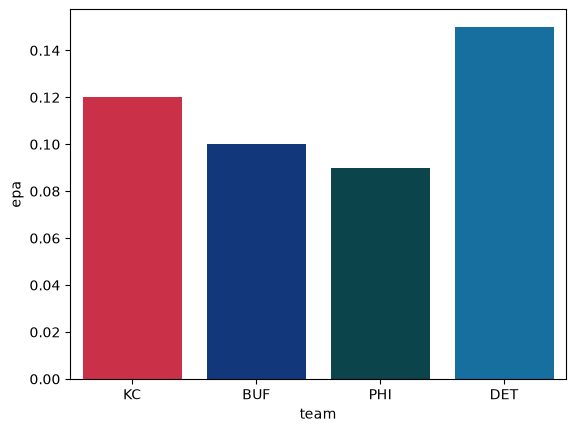
One color per team
team_colors returns one color per team, in the order given. which="secondary" picks the secondary color.
sdvplot.team_colors(df["team"], "nfl", which="secondary")
shape: (4,)
Series: 'team' [str]
[
	"#ffb612"
	"#c60c30"
	"#a5acaf"
	"#b0b7bc"
]
Other libraries
The palette is a plain dict of team -> hex, so other libraries take it directly (not executed here).
Plotly:
import plotly.express as px

px.bar(df.to_pandas(), x="team", y="epa", color="team",
       color_discrete_map=sdvplot.palette("nfl", teams=df["team"]))
Altair:
import altair as alt

p = sdvplot.palette("nfl", teams=df["team"])
alt.Chart(df.to_pandas()).mark_bar().encode(
    x="team", y="epa", color=alt.Color("team", scale=alt.Scale(domain=list(p), range=list(p.values()))),
)
Fallback colors
Not every league has official colors. Where none exist, color_source is "fallback" and the color is one from a
colorblind-safe categorical palette that only keeps teams distinguishable. Check color_source before treating a color as a team's own.
Every OHL team below is a fallback; every NFL team has colors from nflverse.
sdvplot.teams("ohl").select("team_id", "name", "color_primary", "color_source").head()
| team_id | name | color_primary | color_source |
|---|---|---|---|
| 1 | Brantford Bulldogs | #76b7b2 | fallback |
| 10 | Kitchener Rangers | #b07aa1 | fallback |
| 11 | Owen Sound Attack | #bab0ac | fallback |
| 12 | Sudbury Wolves | #76b7b2 | fallback |
| 13 | Flint Firebirds | #f28e2b | fallback |
Run it yourself
Download the notebook (outputs cleared) or open it on GitHub.